


The simplest way to pay your taxes is directly with the IRS, online; The IRS recommends making electronic payments as they are safer, quicker and easier to track. You'll receive instant confirmation and can opt-in to email notifications about your payments.
I recommend creating an account at www.irs.gov/your-account, but you can also pay securely (via debit, credit or bank account) without logging in. Below are the step-by-step instructions (with screenshots) for making Federal Tax payments from a bank account. If you'd like to use a debit/credit card for a fee, start here.
Step 1: Visit the IRS Paymentspage
- Select "Make a Payment"

Step 2: Select Details of the Payment
In the drop-down menus shown, select your reason for payment, where you’d like to apply the payment & the tax year you’re making it for.
- The most common reasons you’ll make a payment are for a balance due or a estimated tax payments.
- Apply Payment to: "Income Tax - Form 1040"
- Select the tax year the payment will be applied to and click continue.
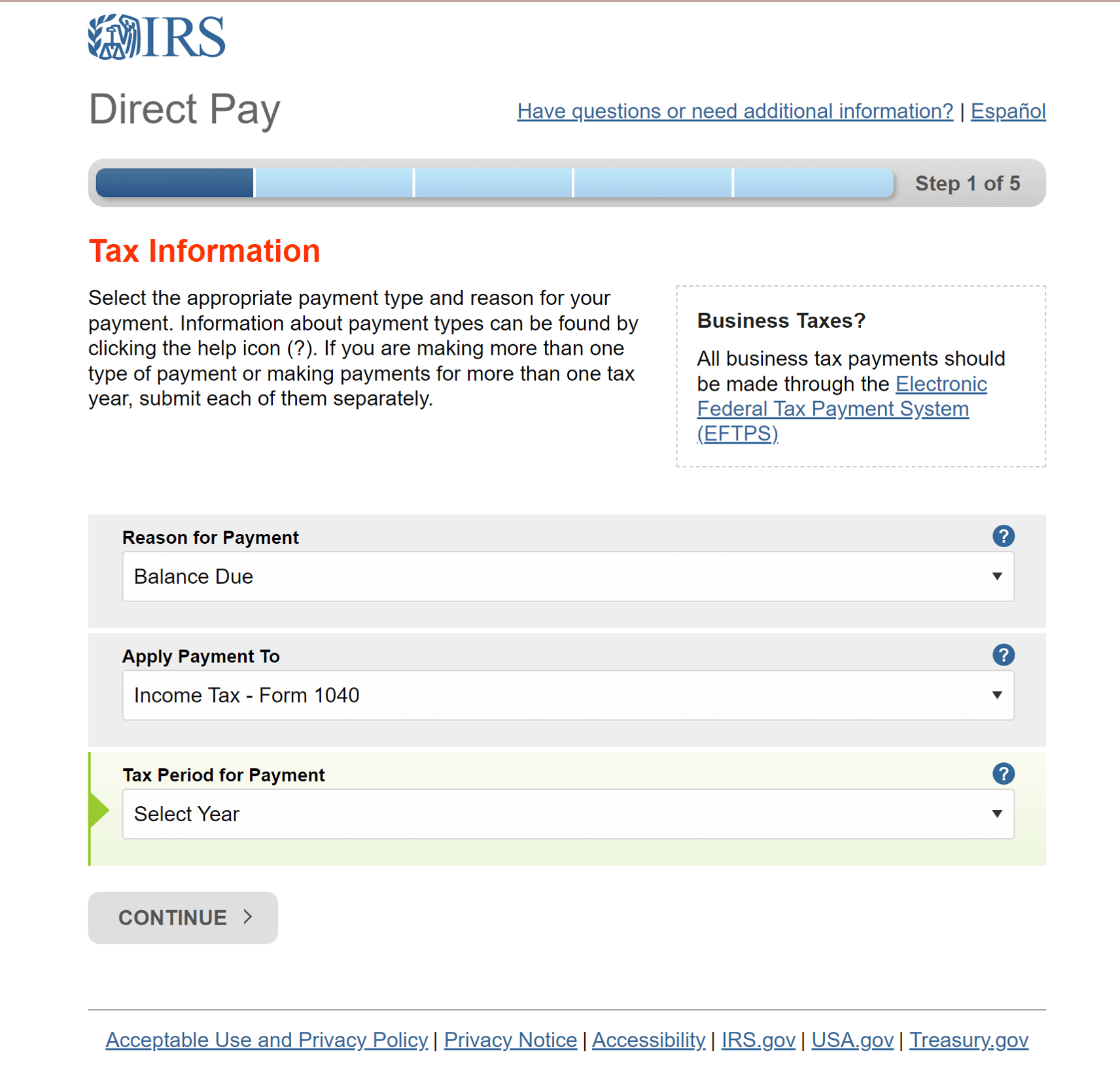
- You'll be asked to confirm the details; review them again, just to be sure!
Step 3: Verify your identity
The IRS will ask you to fill out some identity verification information before submitting the tax payment.
- In the "Tax Year for Verification" Box, you can select the most recent year a return was filed.
- Make sure the information you put on the rest of the form is the same as what was filed on the tax return, including address and filing status. Especially if any changes have occurred since the filing was submitted!

Step 4: Complete your payment information
The next screen will ask you for three things: your payment details, bank information and your email.
- Type in the payment amount you wish to make and select the date you want the payment to be credited, but you can schedule it for today – or for the appropriatetax deadline. Note: the payment may not go through on this selected date due to processing times.
- Enter your bank account information and mark its type as either checking or savings.
- You should opt to receive an email confirmation that your payment has been scheduled.
- The more documentation you have of any tax filings or payments, the better.
- The more documentation you have of any tax filings or payments, the better.
- Click "Continue"

Step 5: Review, Sign & submit your payment to the IRS
Once you click "Continue" at the end of Step 4, a "Disclosure Authorization" Window will appear; read the disclosure and continue through the prompts.
- Review the information you entered again on this screen and if correct, complete the electronic signature section and click "Submit"

The bottom line
Paying your taxes directly with the IRS is the safest and fastest way to pay your taxes.
To make payments in the future even faster and easier, consider creating an IRS account.
Melchert & Humecki can help! We can schedule your tax and estimated payments for direct debit on the appropriate due dates when we file your income tax returns. Schedule a call with me today to discuss your tax payment options.